The Google Apps Script, AppSheet & Looker Studio (Data Studio) course offered at NIMACT is having the latest curriculum related to cloud based business automation, no code app development and live data reporting, with the view to preparing automation professionals for catering to the business, education, healthcare, retail and MIS sector in India. The curriculum and the study materials are revised and updated every six months for the inclusion of the latest Google Workspace features, AppSheet updates, Looker Studio connectors and AI assisted development trends. Accordingly assistance and advice are sought on a continuing basis from the industry for knowing and assessing their requirements.
This is the course where a student learns to build a complete system without spending a single rupee on software. Most small businesses in India already use Google Sheets for their records. They keep their sales, stock, attendance and customer data there. What they do not know is that the same sheet can become a mobile app, can send emails by itself, can generate bills in PDF, and can show a live dashboard to the owner on his phone. That gap between what a business already has and what it can become is exactly what this course fills.
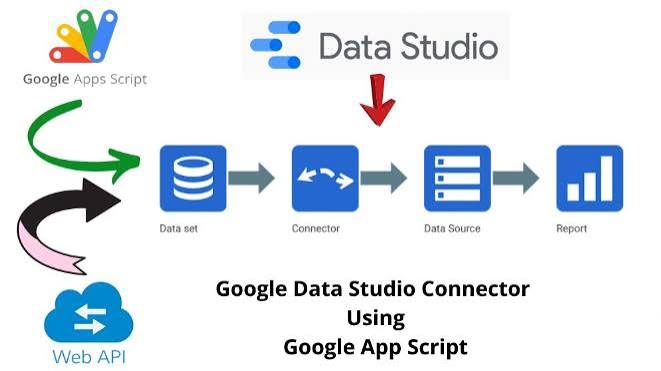
The three tools work as one chain. Apps Script gives the coding power, so anything can be customized and automated. AppSheet gives the app, so field staff can enter data from their phone, even without internet, with photo and GPS. Looker Studio gives the picture, so the owner sees his numbers live without asking anyone for a report. A student who learns all three can walk into any small business and deliver a working system in a few days, and that is a very strong position for both a job and freelancing.
One clarification is given to every student at the start. Looker Studio and Data Studio are not two different tools. Google renamed Data Studio to Looker Studio, but the Extensions menu of Google Sheets still displays the old name. The student will see "Data Studio" on his own screen and open Looker Studio, so both names are used side by side throughout the course.
There is one more practical advantage in this whole setup. Nothing needs to be installed, no server is required, no hosting cost is involved, and updates reach the user automatically. The client's data stays in his own Google account, which also solves the trust problem that small business owners usually have.
NIMACT runs on the model of AI > Programming Language (Coding) > Apps, and this course uses all three stages completely. In the AI stage, tools like ChatGPT, Claude AI, Gemini and Copilot are used to explain a service or a method in simple words, to read an execution log and explain what failed, and to help plan the structure of a system before building it. In the Coding stage the student writes every Apps Script function in JavaScript by his own hand, because an automation that was copied cannot be repaired when the client's data changes next month. In the Apps stage the student builds and delivers finished systems - a billing tool, an attendance app, an inventory system, an enquiry follow up system and a live MIS dashboard - complete with sharing, permissions and handover.
So many opportunities after this course. Schools, coaching institutes, hospitals, clinics, shops, distributors, NGOs, factories and service businesses need low cost automation, and the job profile will be Automation Executive, Google Workspace Developer, Apps Script Developer, No Code App Developer, MIS Executive, Dashboard and Reporting Executive, Business Process Assistant etc. Freelancing is especially strong in this field, because these projects are small, fast to deliver, and every business needs one.
Who Should Attend: People who are involved in Office Administration, MIS Reporting, Accounts, Stock and Field Data Collection and are keen to advance their career. Google Sheets users who want to move from formulas to full systems. Students who want a practical, job ready and freelance ready skill. Business owners, school managers and shop owners who want their own app and dashboard without software cost, as well.
ELIGIBILITY CRITERIA: Open to all. There is no minimum qualification for this course. Working knowledge of Google Sheets is helpful, but the required basics are covered at the beginning of the course.
Mode: Hybrid (Offline + Online + Live Doubt Session)
SYLLABUS:
To get a better idea about the course structure, let us go through a list of important subjects present in this program. Note - Only the important points have been mentioned.
- Cloud and Automation Concept, ICT & AI
- Artificial Intelligence (AI) - ChatGPT, Claude AI, Gemini, Copilot, Grok, DeepSeek, Perplexity
- AI for Concept Explanation, Code Reading, Error Meaning and System Planning
- Gemini in Google Workspace - Sheets, Docs, Gmail and Slides
- Google Workspace Overview
- Google Account, Drive, Folder Structure and Sharing Rules
- Google Sheets, Docs, Slides, Forms and Keep
- Permission, Link Sharing, Owner and Editor Rights
- Google Sheets Foundation for Automation
- Data Structure, Named Range and Clean Data Rules
- Important Functions - QUERY, ARRAYFORMULA, IMPORTRANGE, VLOOKUP, FILTER
- Data Validation, Conditional Formatting and Protected Range
- Pivot Table and Chart in Sheets
- Extensions Menu - Add-ons, Macros, Apps Script, AppSheet, Data Studio
- Name Clarification - Data Studio and Looker Studio are the Same Tool
- Introduction to Google Apps Script
- What is Apps Script and Where it Runs
- Script Editor, Project, File and Deployment Concept
- Bound Script vs Standalone Script
- Authorization, Scope and Permission Screen
- Execution Log and Quota Limits
- JavaScript Fundamentals for Apps Script
- Variable, Data Type and Operator
- Condition - if, else, switch
- Loop - for, while, for of
- Array and Array Methods
- Object and JSON Structure
- Function, Parameter and Return Value
- Try Catch and Error Handling
- Spreadsheet Service
- SpreadsheetApp, Sheet, Range and Cell
- getValue, getValues, setValue, setValues
- Insert, Delete, Copy and Move Rows and Columns
- Formatting through Code - Font, Colour, Border, Number Format
- Sorting, Filtering and Searching through Code
- Bulk Data Handling and Performance Optimization
- Custom Function (UDF) for Sheets
- Custom Menu, Dialog Box and Sidebar
- HTML Service and User Interface Basics
- Project
- Gmail Service
- Sending Email through Code
- Email with Attachment, HTML Body and CC BCC
- Bulk Email and Mail Merge from Sheet
- Reading Inbox, Labels and Auto Reply
- Google Forms Automation
- Form Creation and Question Handling through Code
- Form Response to Sheet Connection
- On Form Submit Trigger
- Auto Confirmation Email and Auto Certificate Sending
- Google Docs Automation
- Document Create, Open and Edit through Code
- Template Document with Placeholder Replacement
- Auto Letter, Bill, Certificate and Report Generation
- PDF Conversion and Auto Saving to Drive
- Google Drive Service
- File and Folder Create, Copy, Move, Rename and Delete
- File Search, File Type and Sharing through Code
- Bulk File Processing and Folder Automation
- Google Calendar and Other Services
- Event Creation, Update and Reminder
- Google Slides Automation Basics
- Contacts and Groups Basics
- Triggers and Scheduling
- Simple Trigger - onOpen, onEdit, onFormSubmit
- Installable Trigger and Time Driven Trigger
- Daily, Hourly and Weekly Automation
- Trigger Management and Failure Notification
- Web App and External Connection
- doGet and doPost Functions
- Web App Deployment and Access Setting
- HTML Form to Sheet Data Entry
- UrlFetchApp - API Call, GET, POST and JSON Handling
- Connecting Third Party Services and Webhooks
- Script Properties and Secure Key Storage
- Project
- Google AppSheet
- Introduction to No Code App Development
- Data Source Connection - Sheets, Excel, Cloud SQL
- App Creation from a Google Sheet
- Table, Column Type, Key and Label Setting
- Virtual Column and Expression Language
- View Types - Table, Deck, Gallery, Form, Map, Chart, Dashboard
- Form Design, Validation and Required Fields
- Image, File, Signature, Barcode and Location Capture
- Offline Working and Data Sync
- Action - Add, Edit, Delete, Navigate, Call, WhatsApp, Email
- Bot and Automation - Event, Process, Task
- Automatic Email, Notification and PDF Report from AppSheet
- Security Filter, User Role and Data Access Control
- App Branding, Icon, Theme and Format Rules
- App Testing, Sharing, Deployment and User Management
- AppSheet Plan, Limits and Cost Awareness
- Project
- Looker Studio (Data Studio)
- Introduction to Data Visualization and Dashboarding
- Opening Looker Studio from the Sheets Extensions Menu
- Data Source Connection - Sheets, BigQuery, MySQL, CSV, Connectors
- Data Refresh, Live Data and Extract Data
- Dimension, Metric, Field Type and Aggregation
- Calculated Field and CASE Statement
- Data Blending from Multiple Sources
- Chart Types - Scorecard, Table, Bar, Line, Pie, Geo Map, Time Series
- Filter, Date Range Control, Drop Down Control and Cross Filtering
- Page, Layout, Theme and Report Design Rules
- Interactive Dashboard and Drill Down
- Report Sharing, Access Control and Embedding
- Scheduled Email Delivery and PDF Export
- Dashboard Design Principles and Data Storytelling
- Apps and Practical Systems
- Shop Billing System with Auto PDF Invoice and Email
- Student Attendance App with Daily Report to Parents
- Inventory and Stock Management System with Low Stock Alert
- Enquiry and Follow Up System with Auto Reminder
- Employee Leave and Field Visit App with GPS
- Complaint and Service Request Tracking System
- Admission and Fee Management System
- Live MIS Dashboard for the Business Owner
- Integration and Career
- Connecting Apps Script, AppSheet and Looker Studio as One System
- Comparison with VBA, Power Automate and Power BI
- Data Security, Backup and Privacy Practice
- Client Handling, Requirement Gathering and Project Costing
- Freelancing and Portfolio Building
- Emerging Technologies - AI plus No Code in Business Automation
- Project Work
- Internship